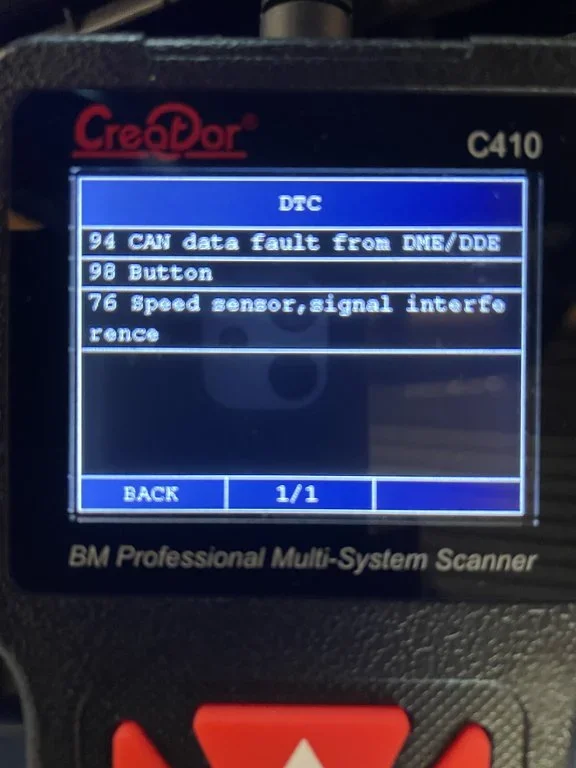
In the same ‘conversation’ I inputted your other two codes
BMW Code 76 (Speed Sensor, Signal Interference) indicates that your ABS/ASC (or DSC) module is receiving an unreadable, distorted, or heavily interrupted signal from one or more of the wheel speed sensors. Unlike a "sensor circuit open" fault—which means the sensor is totally dead or unplugged—"signal interference" means the sensor is sending data, but the electronic waveforms are too erratic for the computer to safely calculate vehicle speed. [
1,
2,
3]
This code pairs perfectly with your previous
DTC 94 CAN data fault. If the ABS module cannot figure out how fast a wheel is turning due to interference, it cannot broadcast stable speed data to the engine computer (DME) over the CAN bus network, triggering both codes simultaneously. [
1]
Root Causes of Signal Interference
The "interference" can be either mechanical (physical debris disrupting the magnetic reading) or electromagnetic/electronic (bad wiring or internal sensor decay): [
1]
- Rust and Debris on the ABS Tone Rings (Most Common): The wheel speed sensor reads a slotted metal ring (tone/reluctor ring) attached to the spinning wheel hub or driveshaft. Over time, rust chips, road grit, or metallic brake dust fills the gaps or pushes against the sensor, corrupting the magnetic pulse. [1, 2]
- Swollen Reluctor Rings: Rust can build up underneath the rear reluctor rings, causing the ring to expand or warp outward. As the ring spins, it physically strikes or rubs against the tip of the speed sensor, destroying the signal pattern. [1]
- Chafed or Failing Wiring Insulation: The wiring harnesses running from the wheel wells to the inner chassis flex every time you steer or hit a bump. Cracked or dried insulation lets in water, inducing voltage fluctuations and electronic interference. [1, 2, 3]
- Decaying Sensor Internals: The internal copper windings of an older, original sensor degrade with heat cycles, failing to generate a clean alternating current (AC) signal to the module. [1]
Diagnostic Step-by-Step Fix
To resolve the interference code, focus on physical inspection at the wheel hubs:
1. Isolate the Problem Wheel
- Use diagnostic software like INPA to look at the "Live Data" or "Status" screen for the ABS/ASC module.
- Drive the car slowly. Watch the individual wheel speed values. The wheel showing an erratic, jumping speed graph (or dropping to 0 mph suddenly) is the source of Code 76. [1]
2. Pull and Clean the Sensor [
1]
- Remove the wheel, locate the sensor on the back of the hub casting, and remove the single 5mm Allen bolt.
- Carefully wiggle and pull the sensor out.
- Inspect the tip of the sensor. If it has deep scrape marks, the reluctor ring is warped or swollen and hitting it.
- Wipe off any metallic sludge or grit clinging to the magnetic tip using a cloth and brake cleaner. [1, 2, 3]
3. Inspect the Tone Ring (Crucial Step)
- Peer directly down into the empty sensor mounting hole using a flashlight.
- Have someone slowly rotate the brake rotor so you can inspect the spinning metal teeth of the tone ring.
- Look for missing teeth, packed rust, or heavy dirt. Use a small wire brush or pick to scrape out debris blocking the window gaps. [1, 2]
4. Replace the Sensor or Harness [
1]
- If cleaning the sensor tip and ring does not clear the code, replace the affected wheel speed sensor. Stick to high-quality or OEM brands (like Bosch or ATE), as cheap aftermarket options frequently suffer from built-in calibration and "signal interference" bugs. [1]
If you don't have a diagnostic scanner to check live wheel data, let me know if your
speedometer jumps around while driving, or if this fault only triggers when turning the
steering wheel, which can help isolate if it is a front or rear sensor!